최근 1인 크리에이터부터 전문 프로덕션까지 촬영 현장에서 아이패드(iPad)를 필드 모니터나 디렉터 모니터로 활용하는 경우가 많다. 특히 사이드카(Sidecar) 기능이나 전문 무선 송수신 앱으로 활용도가 높아졌다.
아이패드를 필드 모니터 또는 디텍터 모니터 등으로 활용할 때의 장점을 나열하면, 첫째 우수한 디스플레이 품질을 들 수 있다. 비슷한 가격대의 전문 필드 모니터와 비교해도, 아이패드의 색 정확도, 대비, 해상도에서 훨씬 뛰어나다. 둘째, 직관적인 터치 인터페이스, 내장된 배터리와 와이파이, 블루투스 등 사용성이 우수하고, 셋째, 앱을 통한 확장성은 촬영 시 모니터 뿐만아니라 간편한 편집 용도로 활용, 각종 다양한 용도로 확장할 수 있어 전용 필드 모니터와 비교 불가할 정도로 우수하다.
단점으로는 촬영 장비 전용의 입력 단자(HDMI 와 SDI 단자 등)의 부재로 (카메라와 아이패드를 연결하는 전용의 앱이 없는 경우) 영상 소스의 입력을 위해서는 캡처 카드나 무선 송신기, 또는 무선 비디오 인커더가 필요하다. 둘째, 전문 모니터와 비교 시, 냉각 팬이 없고 단단한 하우징에서 아쉽고, 따라서 거친 촬영 현장에 적합한 내구성 및 발열문제에 의문이 있다. 셋째, 뛰어난 디스플레이 품질에도 불구하고 밝기(휘도)가 전문 필드모니터보다 낮아서 실외 일광 조건에서 화면 확인이 어렵다. 그 외, 무선 연결 시 레이턴시(지연시간) 문제가 있으며, 내장 배터리로 인해 장시간 촬영 시 보조배터리나 별도의 전원 공급이 필요하다.
여러 장점과 단점을 감안해서 판단해 보면, 정확한 초점 작업(포커스 풀러)을 위한 촬영 감독용으로는 전문 필드 모니터가 더 나은 선택이겠지만, 전체적인 구도나 색감을 체크하는 디렉터 용도로는 아이패드가 훨씬 경제적이고 훌륭한 대안이라 생각한다.
구도나 색감 체크를 위한 디렉터 용도로 아이패드를 활용하기 위한 리그 디자인 및 제작
▶ 디자인 컨셉: 감독을 위한 견고한 iPad 리그
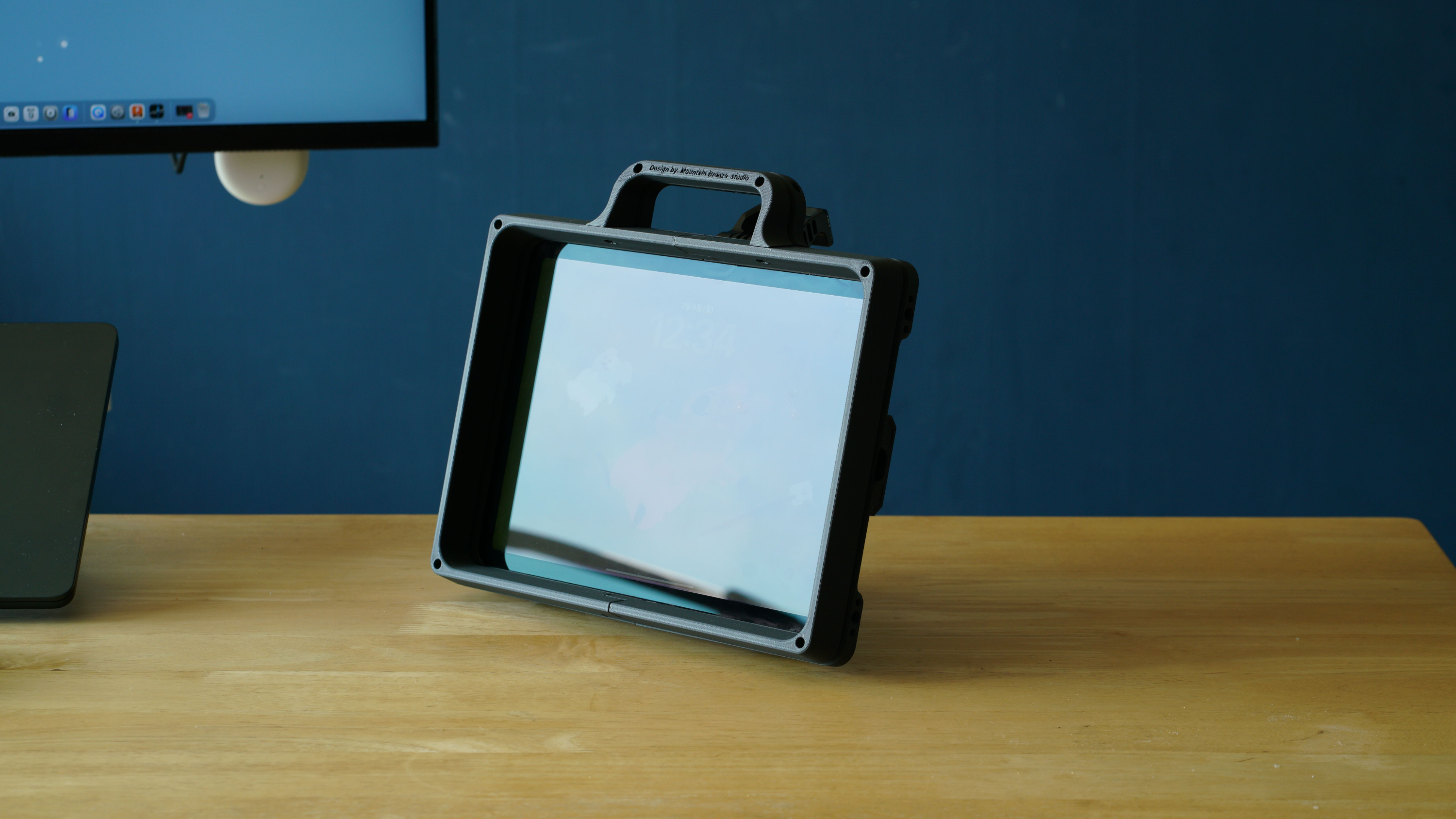
얇은 판 형태의 아이패드는 일상에서 뛰어난 휴대성을 보이지만, 거칠고 번잡한 촬영 현장에서는 내구성이 약해서 편하게 활용하기 어려웠다. 아무 장소나 쉽게 거치할 수 있을 것, 터치 스크린 조작에 영향을 끼치지 않으며 전면의 디스플레이와 아이패드 금속 하우징을 보호할 수 있는 범퍼 케이스, 기타 촬영용 부가/보조 장치를 쉽게 장/탈착할 수 있는 확장성 등을 염두에 두고 디자인 했다.
▶ 아이패드 리그의 주요 특징
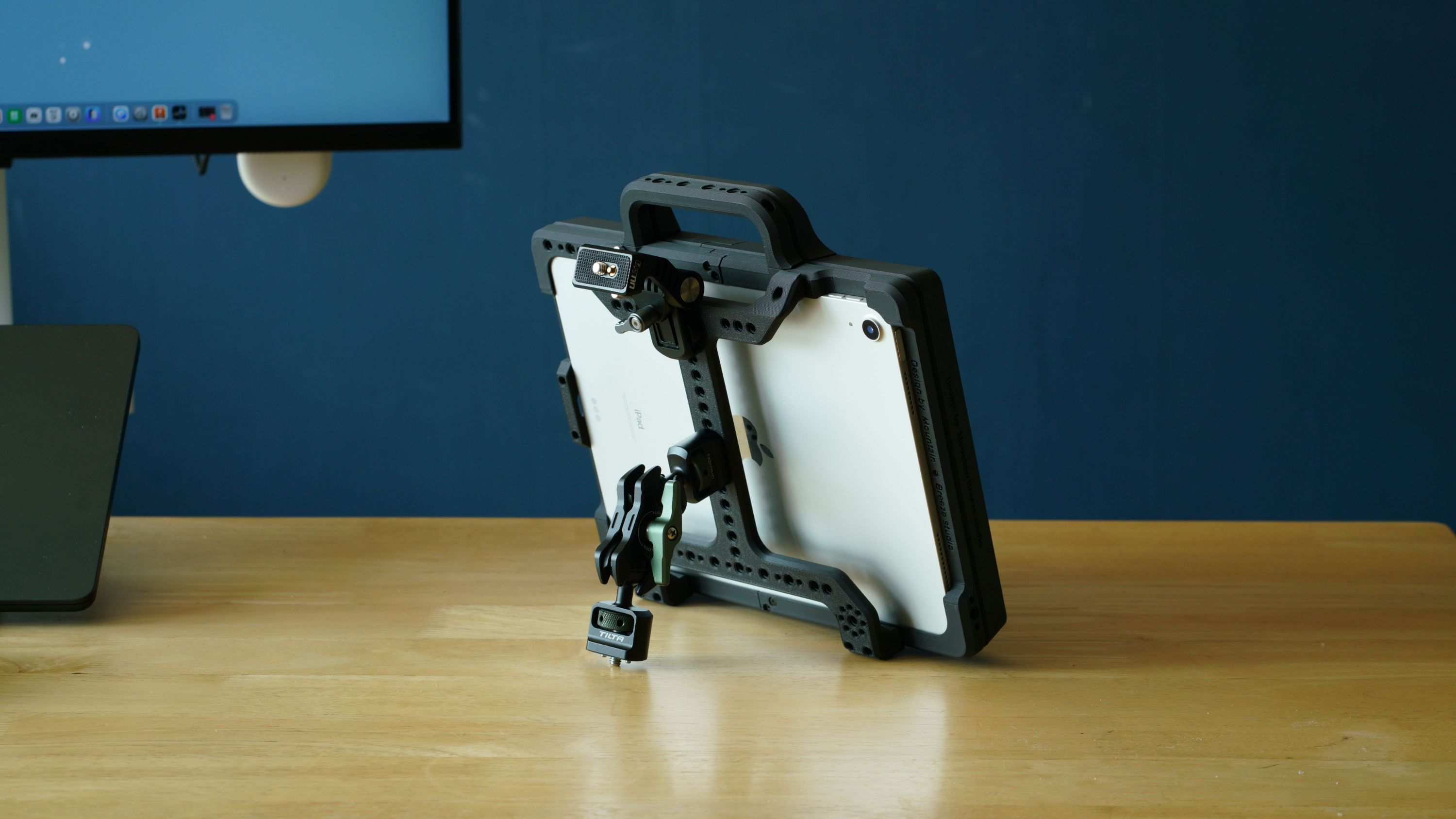
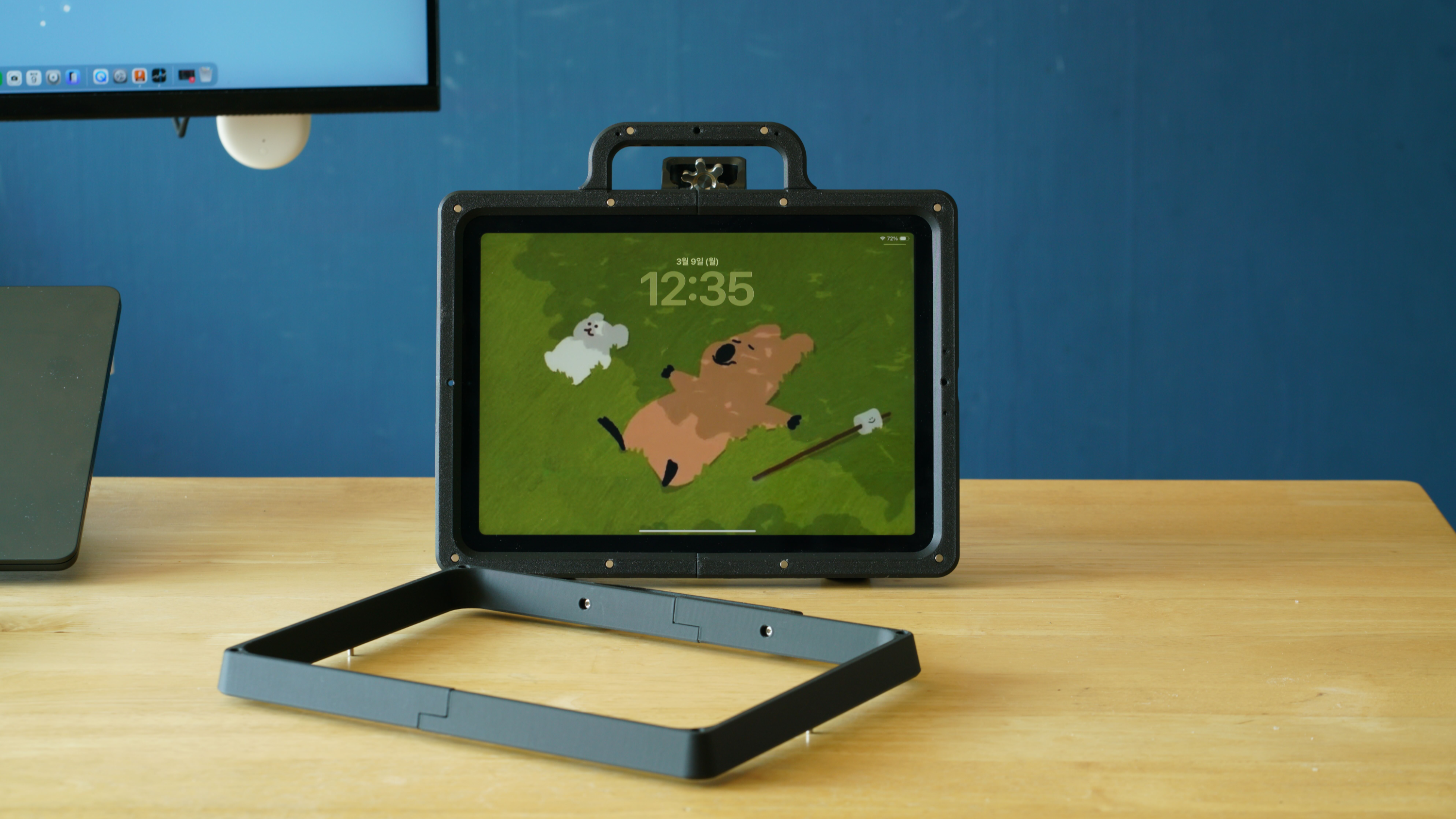
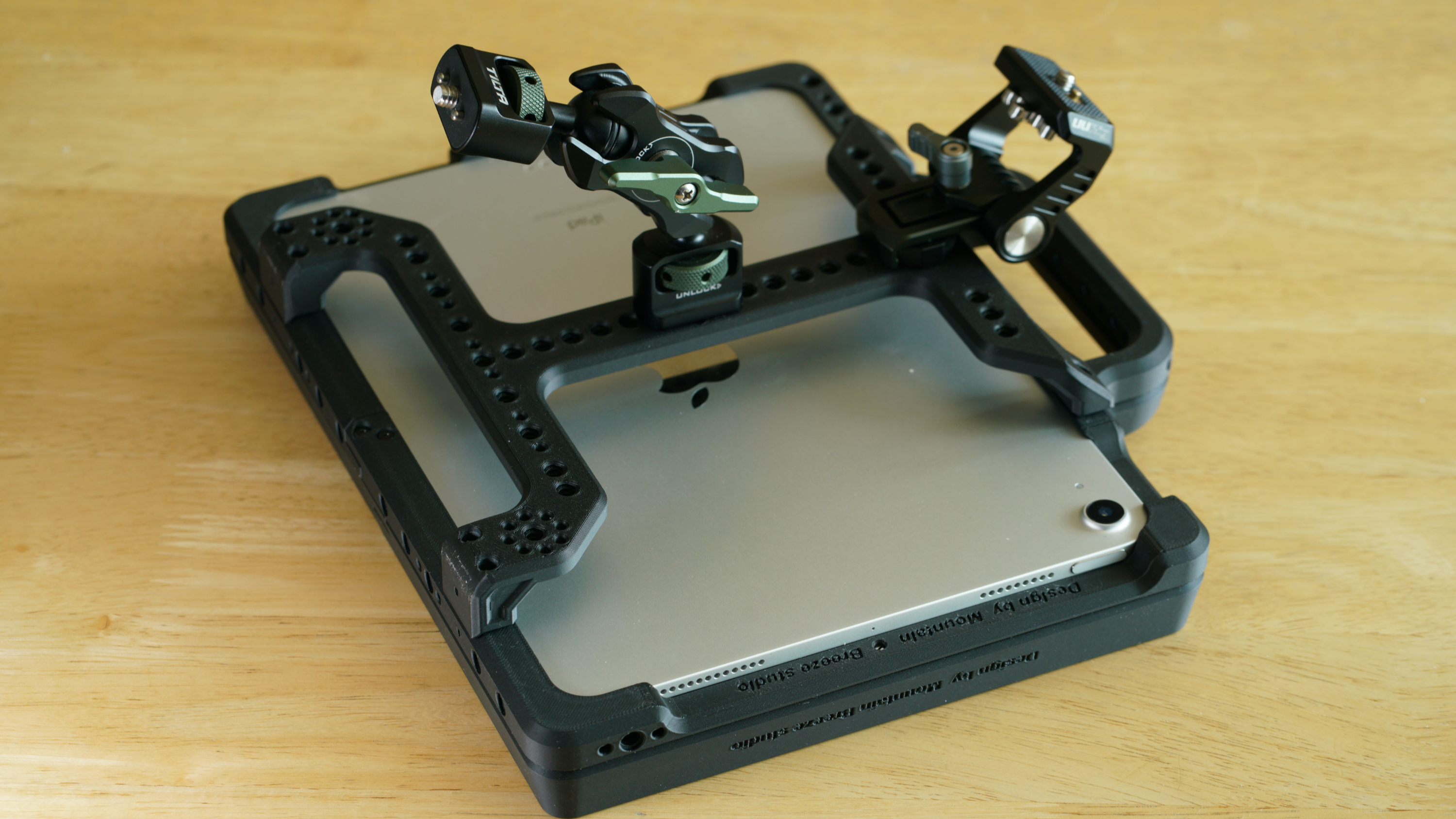
아이패드 리그의 주요 구성은 아이패드를 감싸는 프레임 구조의 케이지, 자석과 위치 고정 핀을 통해 정확한 위치에 안정적이고 쉽게 탈부착이 가능한 전면 보호 가이드 (후드 기능 겸용), 휴대 편이를 위한 상단의 손잡이, 케이지 하단과 측면, 핸들 상단에 1/4인치 홀, Arri 고징 핀 홀, 리그 후면에 추가 악세사리 장착을 위한 서포트 및 후면 손잡이 역할로 구성했다. 아이패드를 들고 사용하는 경우에는 한 손으로 들고 다른 한손으로는 화면을 터치하므로, 양측면에 별도의 그립 구조는 불필요하다고 생각했다. 방열을 위해 후면은 개방된 형태(오픈 프레임)를 유지하였다.
iPad의 얇은 디자인은 일상생활에는 좋지만, 혼란스러운 영화 촬영 현장에는 너무 취약하다. 어떤 환경에서도 견딜 수 있는 견고함, 터치 조작을 방해하지 않으면서 화면을 보호하는 기능, 그리고 높은 확장성이라는 세 가지 목표를 염두에 두고 맞춤형 리그를 설계했다.
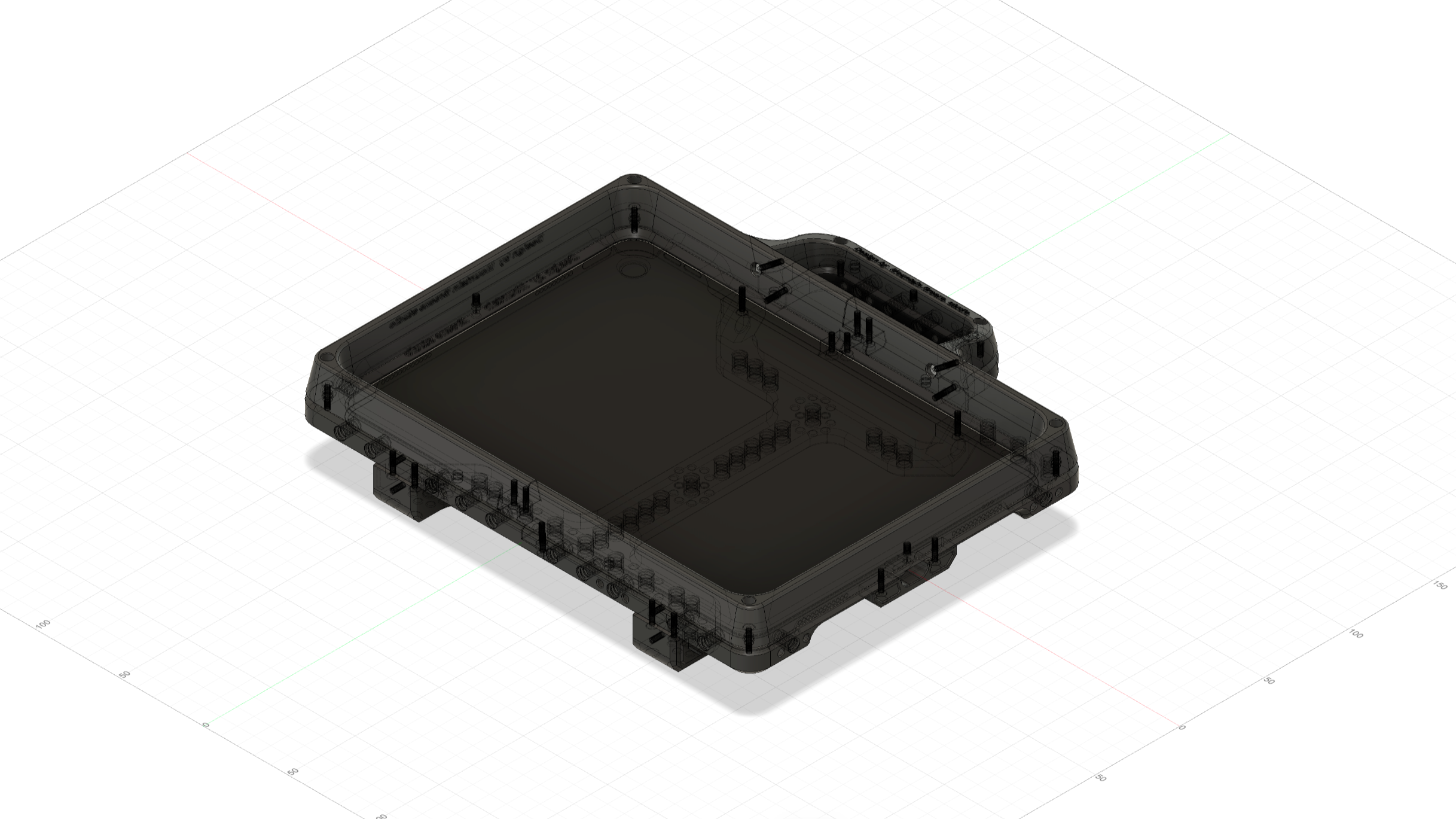
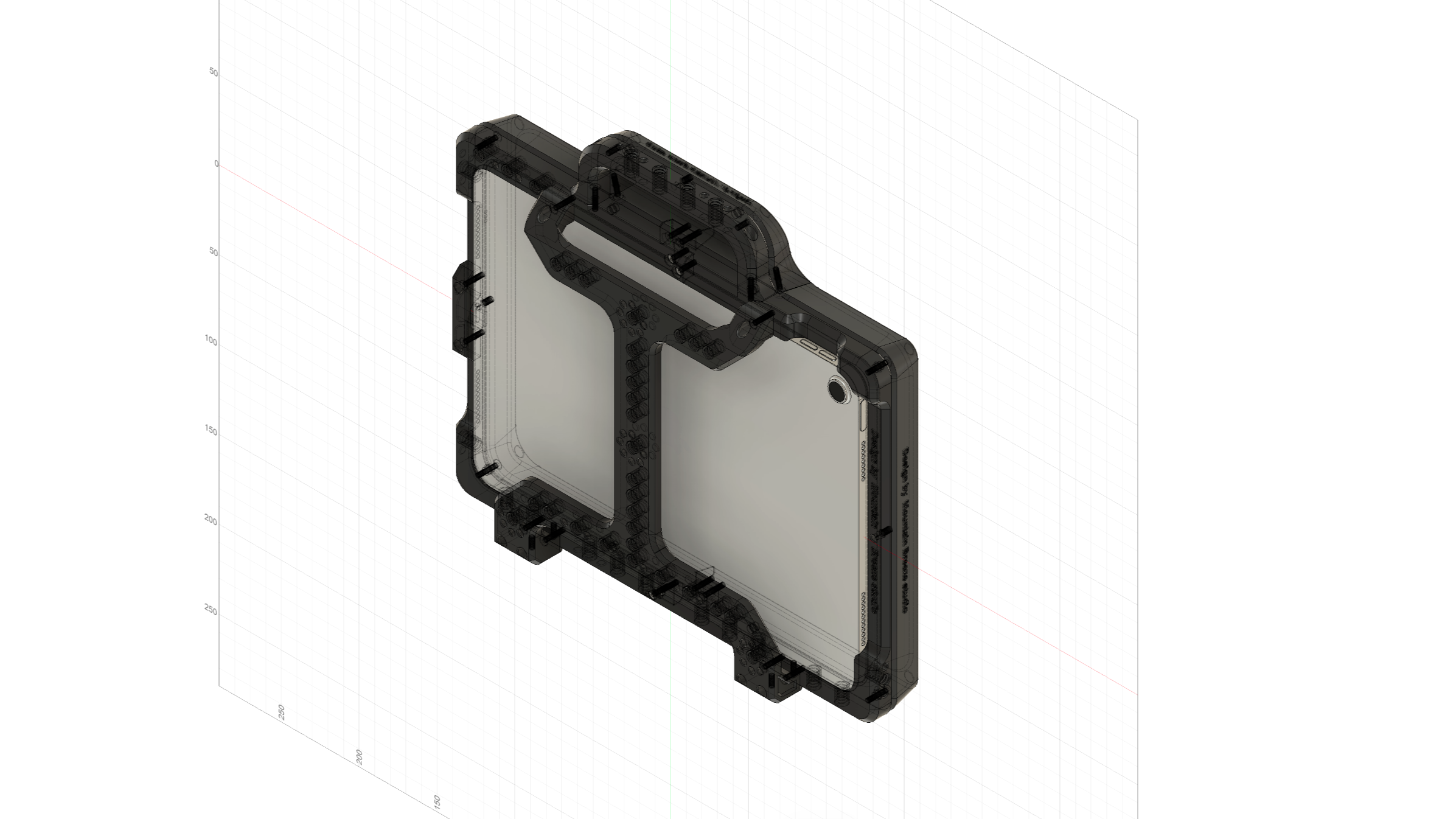

"외부 크기가 동일하므로(247.6 x 178.5 x 6.1 mm) iPad Air 11(M2, M3, M4), iPad Air 5세대 및 iPad Air 4세대와 호환"
"필요 사양: 250 x 250 mm(또는 그 이상)의 출력 공간을 갖춘 3D 프린터"
탈착식 가이드의 회전을 방지하고 구조적 안정성을 확보하기 위해 위치 고정 핀이 필수적이다. 핀을 생략하지 마십시오.
필요한 부품
M2.5 접시머리 나사 (길이 10mm) 20개
분리형 가이드 선택 시: 네오디뮴 원형 자석 (지름 4mm, 두께 2mm) 20개, M3 위치 고정 핀 (길이 8mm) 3개
또는 고정형 가이드 선택 시: M2.5 나사 (길이 12mm) 4개
Designing a Custom iPad Rig for Professional Video Production
Introduction
Recently, the iPad has become a staple on film sets, serving as a high-quality field or director's monitor. Thanks to features like Sidecar and professional wireless transmission apps, its utility has reached new heights for everyone from solo creators to professional production crews.
The Pros and Cons of iPad as a Monitor
The Pros - Superior Display Quality: Compared to dedicated field monitors in the same price range, the iPad offers far better color accuracy, contrast, and resolution.
Intuitive Interface: Built-in batteries, Wi-Fi, Bluetooth, and a responsive touch interface provide unmatched usability.
Versatile Scalability: Beyond monitoring, it can be used for on-site editing and various apps, making it more versatile than traditional monitors.
The Cons - Lack of Dedicated Inputs: Without built-in HDMI or SDI ports, it requires capture cards or wireless transmitters.
Durability & Thermal Issues: Unlike professional monitors with cooling fans and rugged housings, iPads are vulnerable to heat and physical impact.
Brightness & Latency: Lower peak brightness compared to high-bright field monitors makes outdoor viewing difficult, and wireless connections can introduce slight latency.
Conclusion: While dedicated monitors are better for focus pullers, the iPad is an incredibly cost-effective and brilliant alternative for directors to check composition and color.
The Design Concept: A Rugged iPad Rig for Directors
The iPad’s thin form factor is great for daily life but too fragile for a chaotic film set. I designed a custom rig with three goals in mind: sturdiness for any environment, screen protection without hindering touch controls, and high expandability.
Key Features of the Rig
Frame-Structured Cage: A robust skeleton that wraps around the iPad to protect the metal housing while leaving the back open for optimal heat dissipation.
Magnetic Front Guide: A detachable guard that uses magnets and locating pins for easy attachment. It serves as both a screen protector and a sun-hood for better outdoor visibility.
Ergonomic Handling: I added a top handle for easy carrying and a rear support/handle for stability. Since directors often hold the device with one hand while touching the screen with the other, I intentionally omitted side grips to keep the design sleek and functional.
Universal Expandability: The cage features multiple 1/4" screw holes and ARRI locating pins on the bottom, sides, and handle to easily mount wireless receivers, SSDs, or external batteries.
"Compatible with iPad Air 11" (M2, M3, M4), iPad Air 5th Gen, and iPad Air 4th Gen due to identical external dimensions (247.6 x 178.5 x 6.1 mm)."
"Requirement: 3D printer with 250 x 250 mm (or larger) build volume."
Locating pins are essential for the detachable guide to prevent rotation and ensure structural stability. Do not omit them
Parts Required
M2.5 Countersunk Screws (10mm length) x 20
For Detachable Guide: Neodymium Round Magnets (4mm diameter, 2mm thickness) x 20
M3 Locating Pins (8mm length) x 3
Or for Fixed Guide: M2.5 Screws (12mm length) x 4
https://cults3d.com/en/3d-model/gadget/custom-ipad-rig-for-professional-video-production
Custom iPad rig for professional video production
Designing a Custom iPad Rig for Professional Video Production Introduction Recently, the iPad has become a staple on film sets, serving as a high-quality field or director's monitor. Thanks to features like Sidecar and professional wireless transmission ap
cults3d.com


